Why Your UI Sometimes Shows "Old" Data on Purpose
A brief flash of stale data after a refresh isn't always a bug — it's often eventual consistency at work. Why modern frontends favor a responsive UI with a background refresh over waiting for perfect freshness.
- Frontend at Scale
- Frontend Architecture
- Eventual Consistency
- Distributed Systems
- System Design
(Eventual Consistency Explained)
Have you ever refreshed an application... …and still seen old data for a few seconds?
At first, it feels like a bug. But in many large-scale systems... It's actually a design decision.
Imagine you're using a collaboration platform. A teammate updates a task.
You refresh immediately. For a brief moment... You still see the previous value. Then, a second later, everything updates.
So what happened?
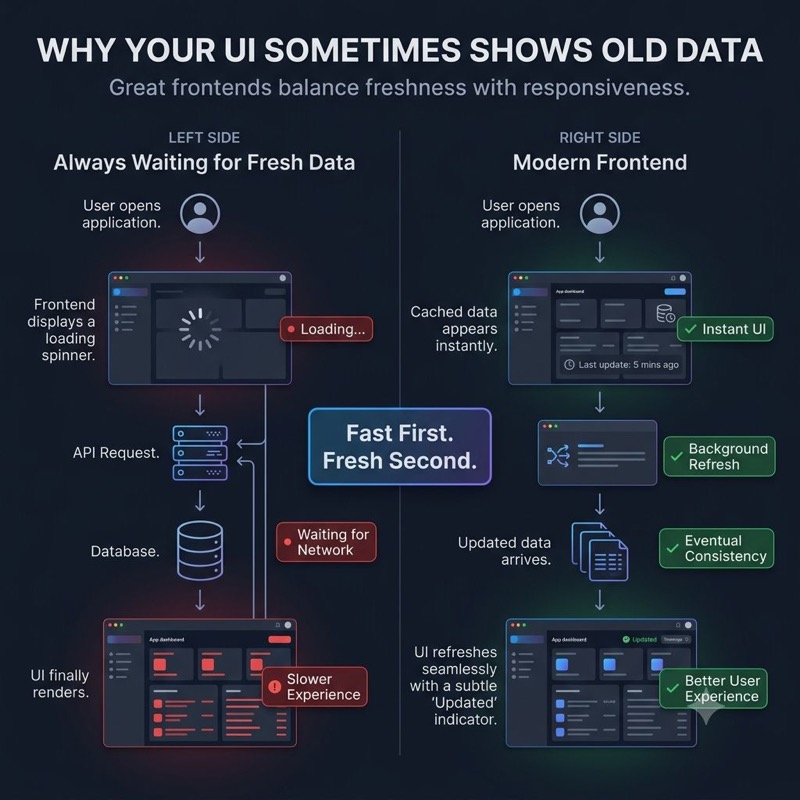
The application wasn't "wrong." The data simply hadn't reached every part of the system yet.
Large-scale platforms often separate:
- 📖 Systems optimized for reading.
- ✍️ Systems responsible for writing.
That improves scalability.
But it also introduces a trade-off. Not every user sees every update instantly.
Modern frontend applications are designed with this reality in mind. Instead of constantly forcing fresh requests, they often:
✓ Show cached data immediately. ✓ Refresh in the background. ✓ Update the UI when newer data arrives. ✓ Prioritize responsiveness over perfect immediacy.
One lesson that's changed how I think about frontend architecture: Users notice slow applications more than slightly stale data.
A responsive UI with a quick background refresh often feels better than making users wait for every screen to be perfectly up to date.
At scale, frontend architecture isn't just about displaying data. It's about choosing when freshness matters and when speed matters more.
Have you worked on a product where eventual consistency improved the user experience instead of hurting it?
Keep reading
Why Your AI UI Shouldn't Wait for a Chat Response
Treating every AI interaction like a chat message breaks down once AI becomes part of a real workflow — the frontend needs structured decisions it can render as explicit states, not paragraphs it has to interpret.
Why Does AI-Generated Frontend Code Get Messy So Fast?
AI can build a React component or wire up an API integration in seconds, yet an AI-assisted frontend can get harder to maintain just as fast — because AI protects the problem you gave it, not the architecture around it.
Why Your Backend Says "200 OK" While Your User Says "It's Broken"
A green API dashboard doesn't mean a working page — hydration failures, broken renders, and slow third-party scripts all hide behind a 200 status. Why frontend observability has to track the user journey, not just the response code.