Why Your Backend Says "200 OK" While Your User Says "It's Broken"
A green API dashboard doesn't mean a working page — hydration failures, broken renders, and slow third-party scripts all hide behind a 200 status. Why frontend observability has to track the user journey, not just the response code.
- Frontend at Scale
- Observability
- Web Performance
- Frontend Architecture
- System Design
Your API monitoring dashboard is green. 200 OK. Response time: 180ms. Error rate: 0.1%. Everything looks healthy.
Then a user says: "The page is broken."
Who's right? Possibly both. An HTTP 200 response only tells you the server successfully returned a response — it doesn't tell you what happened inside the browser.
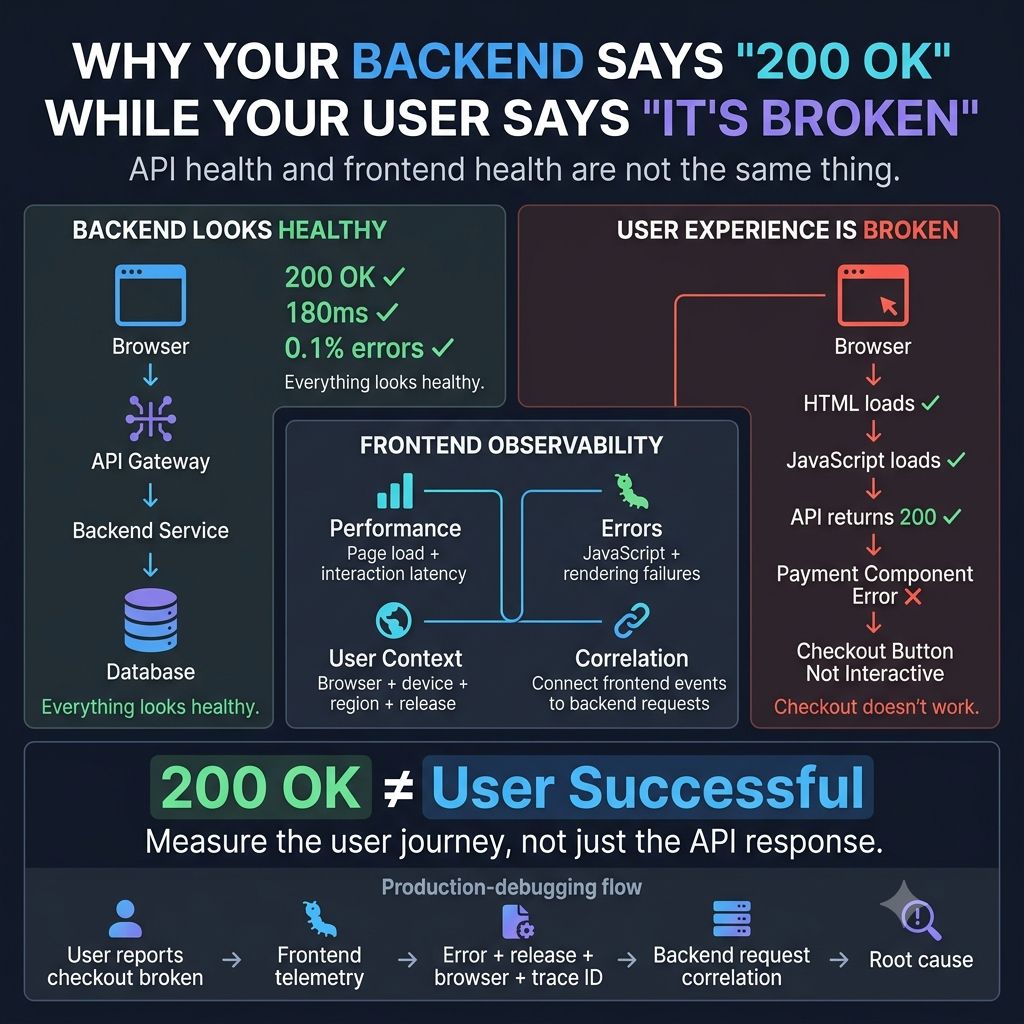
The frontend could still have a JavaScript runtime error, a failed component render, a hydration failure, broken client-side routing, a slow third-party script, a failed image or font, long main-thread blocking, a state synchronization problem, or a poor interaction experience.
From the backend's perspective: 200 OK. From the user's perspective: nothing works. That's why frontend observability needs to go beyond API monitoring — you need visibility into the actual user journey.
For example: user opens checkout → HTML loads ✓ → JavaScript loads ✓ → API returns 200 ✓ → payment component throws an exception ❌ → checkout button never becomes interactive. Your backend dashboard can remain completely green while your conversion rate falls. That's the gap.
Modern frontend observability should connect:
- 📊 Performance — how long did the page and interactions take?
- 🐛 Errors — did JavaScript or rendering fail?
- 🌍 User context — which browser, device, region, or release was affected?
- 🔗 Correlation — which backend request was associated with the frontend failure?
- 📈 Business impact — did the problem actually prevent users from completing the journey?
This changes the debugging question from "is the API healthy?" to "can users successfully complete the task?" — a much more useful question.
One lesson I've learned from large frontend systems: Frontend observability isn't about collecting more telemetry. It's about connecting technical signals to user outcomes. 200 OK doesn't mean "user successful," and a low error rate doesn't mean "experience is healthy." The system is healthy only when the user journey is healthy.
What's the most misleading "everything is green" production incident you've seen?
Keep reading
Why a Fast Frontend Can Still Feel Slow
Rendering wasn't the bottleneck — waiting was. Why users experience waiting, not JavaScript execution, and the architectural decisions that reduce it.
Why Great UIs Don't Break When One API Fails
One failed request should not blank the page. Error boundaries, fallbacks and partial rendering that keep an interface usable when a service goes down.
Your UI Shouldn't Wait for Everything
Rendering nothing until every API responds makes a fast app feel slow. Progressive rendering, streaming and skeletons that show users something immediately.