Why Your AI UI Shouldn't Wait for a Chat Response
Treating every AI interaction like a chat message breaks down once AI becomes part of a real workflow — the frontend needs structured decisions it can render as explicit states, not paragraphs it has to interpret.
- Frontend at Scale
- AI Architecture
- Frontend Architecture
- AI UX
- System Design
One of the biggest mistakes in AI frontend architecture is treating every AI interaction like a chat message: the user clicks something, the frontend sends a prompt, the LLM generates text, the UI waits, and only then do you figure out what to render. That model breaks down quickly once AI becomes part of a real product workflow.
Take a support dashboard. It doesn't need an AI paragraph — it needs signals: is this customer frustrated, what type of request is this, how severe is the issue, should it be escalated? Those are application states, not chat messages, and that changes the frontend contract. Instead of UI, AI text, interpret, render, you get UI, structured decision, state machine, render — with confidence buckets like high (automate), medium (review), and low (fallback) driving what happens next.
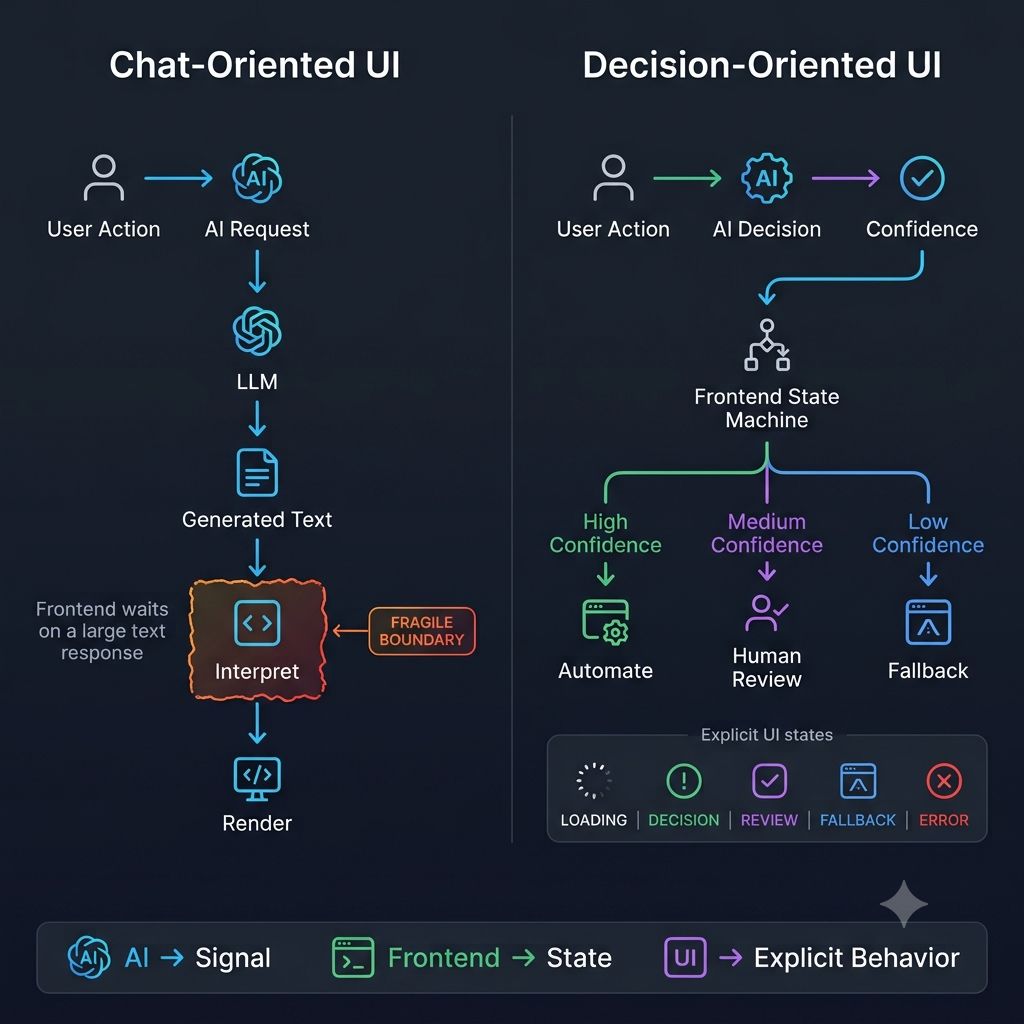
That shift has real architectural consequences. Your frontend can explicitly model loading, decision received, low confidence, human review required, AI unavailable, and decision rejected — instead of hiding all of that behind a single isLoading === false check. Tools like TypeSafe's Jev lean into this by returning structured decision signals — choices, scores, yes/no results — rather than requiring the application to parse generated text. But the lesson isn't about any one tool; it's about the contract between AI and the UI.
When AI returns text, the frontend has to interpret it. When AI returns structured decisions, the frontend can model explicit states — which makes the system easier to test, observe, recover, explain to users, and handle uncertainty with. Frontend architecture isn't about rendering faster; it's about behaving predictably when the backend is uncertain, slow, partially available, or wrong.
One principle worth keeping: If AI becomes part of your product's state machine, its frontend contract shouldn't be designed like a chat response.
Where in your UI are you still treating a structured AI decision as if it were a block of text to interpret?
Keep reading
Why Your AI UI Needs a Fallback When the Model Isn't Sure
A model can return a perfectly valid response that's simply wrong — a 200 OK and a clean render don't mean the user got the truth. AI interfaces need states beyond success and error.
Why Does AI-Generated Frontend Code Get Messy So Fast?
AI can build a React component or wire up an API integration in seconds, yet an AI-assisted frontend can get harder to maintain just as fast — because AI protects the problem you gave it, not the architecture around it.
Why Your AI UI Can't Behave Like a Normal API
A traditional API is request → wait → response → render. An AI UI has to handle streaming tokens, tool calls, cancellation, and reconnection — because it's coordinating with a stateful, asynchronous backend process.