Why Your Frontend Shouldn't Panic When APIs Say "Too Many Requests"
Instantly retrying every failed request doesn't help a struggling backend recover — it feeds the retry storm. Why Retry-After, exponential backoff, and request deduplication are frontend architecture decisions.
- Frontend at Scale
- Frontend Architecture
- Rate Limiting
- API Design
- System Design
One HTTP status code taught me an important lesson about frontend architecture. 429 — Too Many Requests.
The first time I encountered it, my instinct was simple: "Let's retry immediately." That turned out to be the worst possible response.
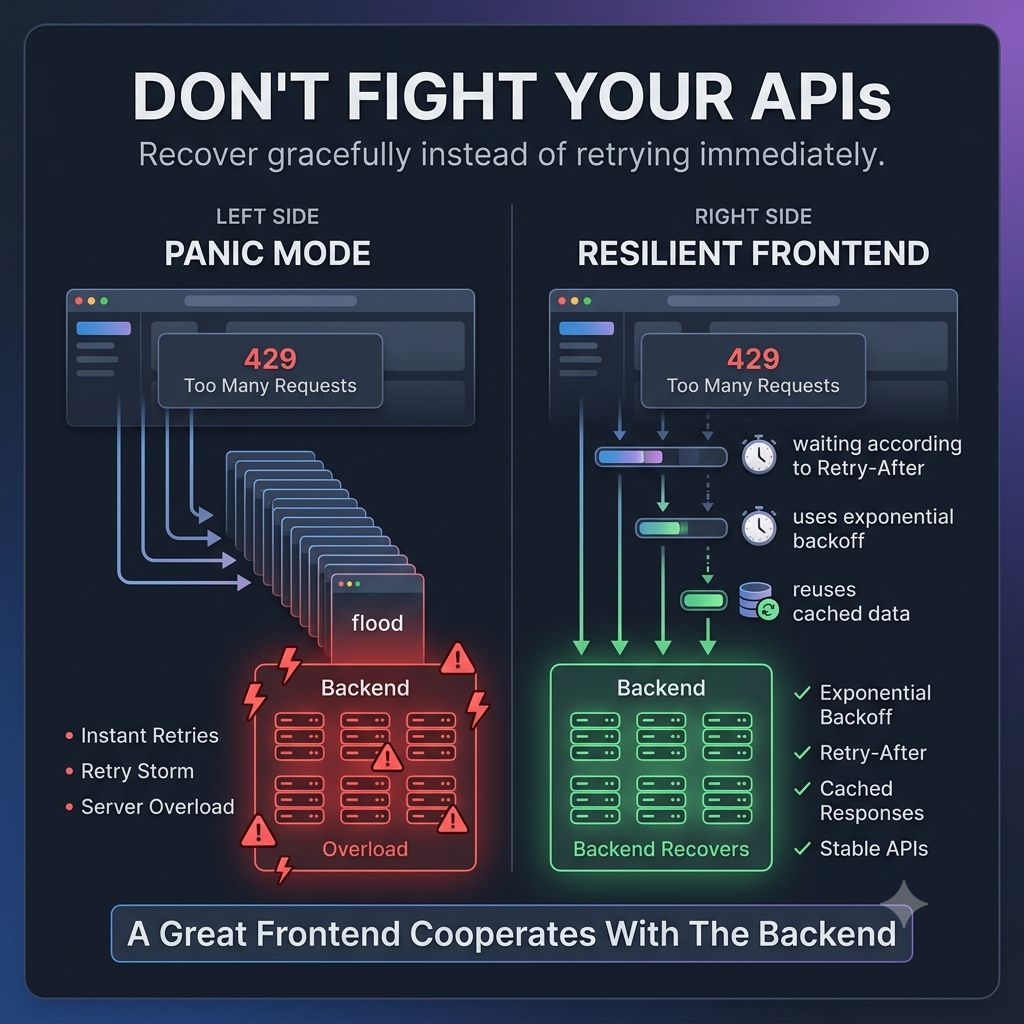
Imagine thousands of users using your application. The backend starts protecting itself with rate limiting. Your frontend instantly retries every failed request.
What happens? You don't recover. You create even more traffic.
Now the backend has even less time to recover. This is sometimes called a retry storm.
The frontend unintentionally amplifies the problem. Great frontend applications behave differently.
Instead of retrying everything immediately, they:
- Respect the server's Retry-After header when available.
- Use exponential backoff instead of instant retries.
- Prevent duplicate requests from multiple components.
- Cache data that hasn't changed.
- Show meaningful feedback instead of endless loading spinners.
One lesson that's changed how I design frontend systems: A good frontend doesn't just consume APIs. It cooperates with them.
Because when traffic spikes, frontend behavior directly affects backend stability.
The fastest way to recover isn't always sending another request. Sometimes... It's waiting a little longer before sending the next one.
Have you ever seen a frontend unintentionally overload an already struggling backend?
Keep reading
Why Your AI UI Shouldn't Wait for a Chat Response
Treating every AI interaction like a chat message breaks down once AI becomes part of a real workflow — the frontend needs structured decisions it can render as explicit states, not paragraphs it has to interpret.
Why Does AI-Generated Frontend Code Get Messy So Fast?
AI can build a React component or wire up an API integration in seconds, yet an AI-assisted frontend can get harder to maintain just as fast — because AI protects the problem you gave it, not the architecture around it.
Why Your Backend Says "200 OK" While Your User Says "It's Broken"
A green API dashboard doesn't mean a working page — hydration failures, broken renders, and slow third-party scripts all hide behind a 200 status. Why frontend observability has to track the user journey, not just the response code.