Why Your AI UI Can't Behave Like a Normal API
A traditional API is request → wait → response → render. An AI UI has to handle streaming tokens, tool calls, cancellation, and reconnection — because it's coordinating with a stateful, asynchronous backend process.
- Frontend at Scale
- AI Architecture
- Frontend Architecture
- Generative AI
- Web Performance
A traditional API works like this: Request → Wait → Response → Render. AI applications don't always work that way. You ask "Analyze this document," and the system might respond with Token → Token → Token → Tool Call → Token → Token — the frontend can't simply wait for one final JSON response. It needs to understand partial state.
A production AI UI may need to handle streaming tokens, tool execution, partial responses, cancellation, network interruptions, retries, errors halfway through generation, and conversation state.
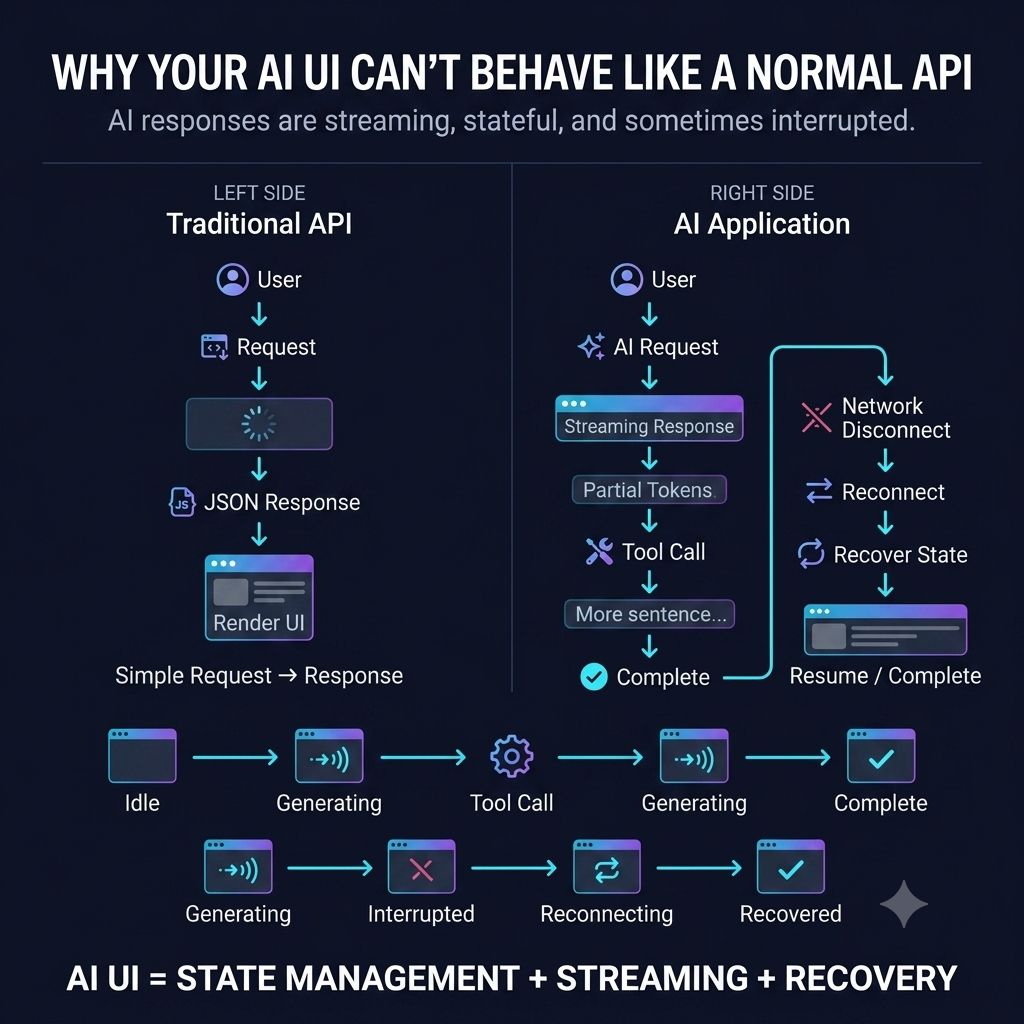
Imagine the user clicks Stop halfway through an AI response. The frontend can't just stop rendering — it also needs to communicate "cancel this generation." Now imagine the connection drops after 70% of the response. When the user reconnects, the UI needs to know what was already completed, what is still running, and what state the server has.
That's fundamentally different from GET → JSON → Render. AI UIs behave more like long-running distributed workflows, and that changes frontend architecture. You need clear state transitions — Idle → Generating → Tool Call → Generating → Complete, or Generating → Interrupted → Reconnecting → Recovered.
The mistake is treating AI as just another API endpoint. It isn't — the frontend is now coordinating with a backend process that may be streaming, stateful, asynchronous, and partially complete.
One principle I would keep in mind: AI UX isn't about rendering text faster. It's about making an unpredictable process feel understandable and controllable.
Users should always know what is happening, whether it's still working, whether they can stop it, whether it failed, and whether they can recover. That's where good AI frontend architecture starts.
How are you designing state management for streaming AI responses?
Keep reading
Why Your Backend Says "200 OK" While Your User Says "It's Broken"
A green API dashboard doesn't mean a working page — hydration failures, broken renders, and slow third-party scripts all hide behind a 200 status. Why frontend observability has to track the user journey, not just the response code.
Why a Fast Frontend Can Still Feel Slow
Rendering wasn't the bottleneck — waiting was. Why users experience waiting, not JavaScript execution, and the architectural decisions that reduce it.
Your Frontend Is Probably Fetching Too Much Data
One of the biggest performance wins isn't a faster API — it's making fewer API calls. Why treating data as a shared resource matters at scale.