Why Your AI UI Needs a Fallback When the Model Isn't Sure
A model can return a perfectly valid response that's simply wrong — a 200 OK and a clean render don't mean the user got the truth. AI interfaces need states beyond success and error.
- Frontend at Scale
- AI UX
- AI Architecture
- Frontend Architecture
- Generative AI
Traditional UIs usually know when something fails: an API times out, you show an error. AI is different — the model can return a perfectly valid response that is simply wrong, and there's no exception to catch.
Imagine a customer asks whether they can get a refund. The model isn't certain, but instead of saying "I don't know," it confidently answers "Yes, your refund has been approved." The API returned 200 OK. The UI rendered successfully. The user just received bad information — and nothing in that pipeline looked broken.
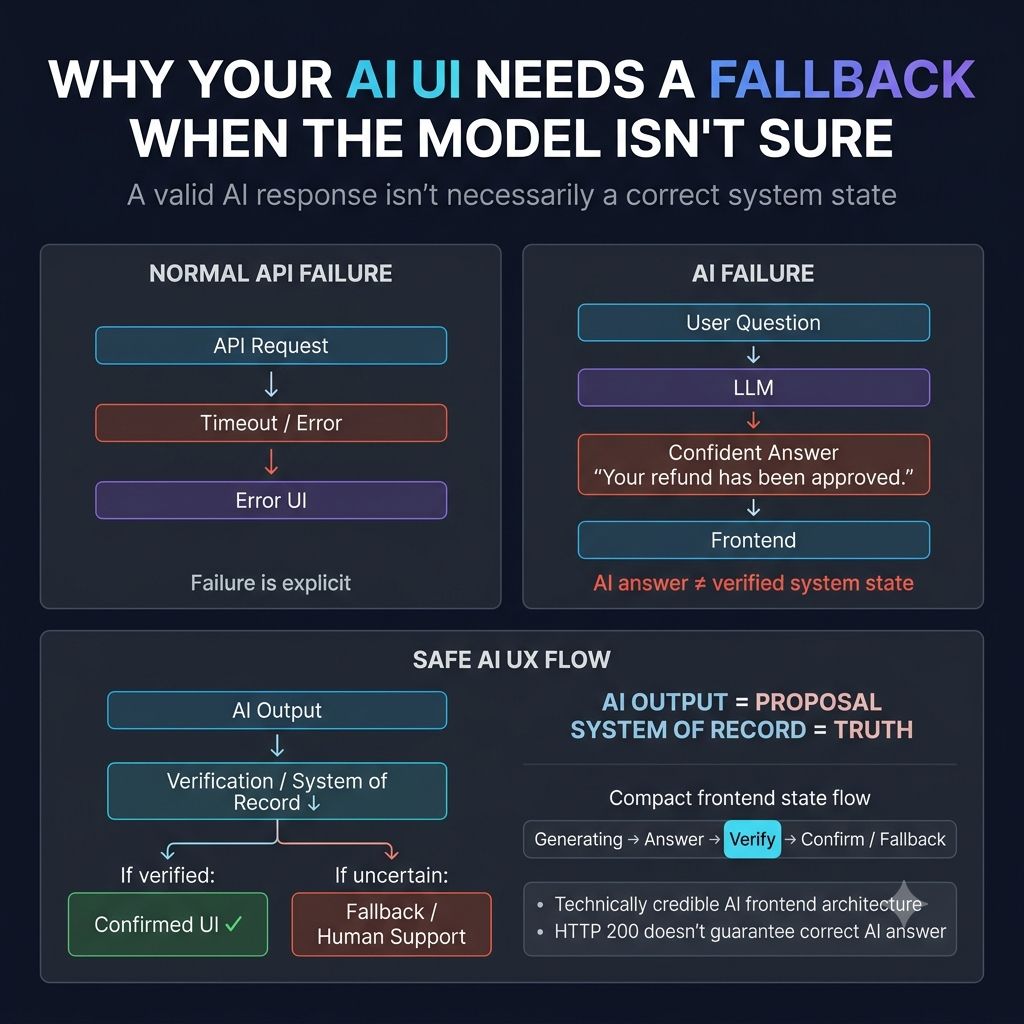
That's why AI interfaces need a different failure strategy than success/error. A more honest state machine looks like generating → answer → needs verification → fallback → human support. The frontend should make uncertainty visible: show sources when available, clearly distinguish generated content from confirmed fact, let users retry, provide an escalation path, preserve conversation context — and never imply an action succeeded until the backend confirms it. That last point matters most: if the model says a payment was refunded, the UI shouldn't treat that sentence as truth. It should wait for the actual system of record.
This is a real architectural boundary, not just a UX nicety: AI output is a proposal, system state is the source of truth. That distinction gets more important the moment the AI can actually perform actions, not just describe them.
One principle I strongly believe in: Design AI interfaces for failure, not just for impressive demos.
When the model is wrong, the UI is the last line of defense before that mistake becomes a user's decision. What should your AI UI do when the model is confident — but wrong?
Keep reading
Why Your AI UI Can't Behave Like a Normal API
A traditional API is request → wait → response → render. An AI UI has to handle streaming tokens, tool calls, cancellation, and reconnection — because it's coordinating with a stateful, asynchronous backend process.
Why Your Backend Says "200 OK" While Your User Says "It's Broken"
A green API dashboard doesn't mean a working page — hydration failures, broken renders, and slow third-party scripts all hide behind a 200 status. Why frontend observability has to track the user journey, not just the response code.
Why Your UI Can Change Without a Single API Call
A delivery ETA updates on screen without you refreshing anything — because the backend pushed the change instead of waiting to be asked. What it takes to make real-time frontend state actually reliable.