Why Your UI Can Change Without a Single API Call
A delivery ETA updates on screen without you refreshing anything — because the backend pushed the change instead of waiting to be asked. What it takes to make real-time frontend state actually reliable.
- Frontend at Scale
- Real-Time Systems
- WebSockets
- Event-Driven Architecture
- Frontend Architecture
Your UI doesn't always need to ask: "Did something change?"
Sometimes, the system can tell it.
Think about a delivery app. You open the screen: "Driver arriving in 8 minutes." You don't keep refreshing the page. Yet a few seconds later: 7 minutes. Then 6. Then the driver's location moves on the map.
What happened? Your frontend didn't repeatedly ask for every update. The backend pushed events to it.
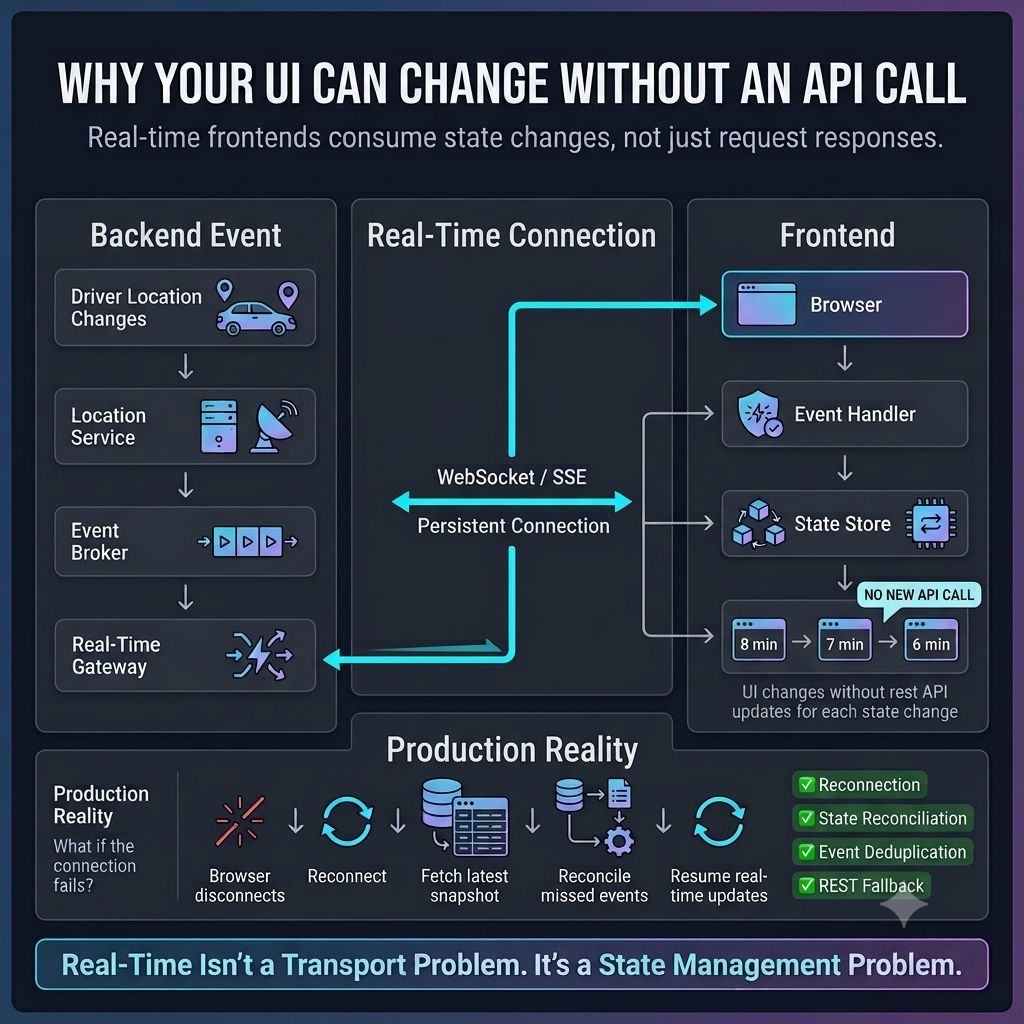
A simplified flow looks like this:
- 📍 Driver location changes.
- ⚡ Backend publishes an event.
- 📡 A real-time gateway receives it.
- 🔌 A WebSocket / SSE connection carries it.
- 🔄 The frontend receives the update and re-renders.
This is where event-driven architecture becomes interesting for frontend engineers. The frontend isn't just consuming APIs anymore — it's consuming state changes over time.
But that creates a new set of problems:
- What if events arrive twice?
- What if they arrive out of order?
- What if the browser disconnects?
- What if the user comes back after missing 50 events?
That's why production-grade real-time UIs need event deduplication, reconnection logic, sequence numbers or timestamps, state reconciliation, snapshot-plus-event approaches, and a graceful fallback to REST APIs.
This is the part that gets missed when people say "let's just add WebSockets." Real-time isn't a transport problem. It's a state management problem.
One architectural principle I keep coming back to: The frontend should not assume it's always looking at the latest state. It should know how to receive, reconcile, and recover — because at scale, networks disconnect, events get delayed, browsers sleep, and systems fail.
A resilient frontend isn't one that receives every event perfectly. It's one that can recover when it doesn't.
How are you handling real-time state synchronization in your frontend — WebSockets, SSE, polling, or a combination?
Keep reading
Why Your Backend Says "200 OK" While Your User Says "It's Broken"
A green API dashboard doesn't mean a working page — hydration failures, broken renders, and slow third-party scripts all hide behind a 200 status. Why frontend observability has to track the user journey, not just the response code.
How Does Uber Know Your Driver Moved Without You Refreshing the App?
A driver moves 200 meters and your screen updates without a refresh — the event pipeline, ordering problems, and filtering decisions behind Uber's live location tracking.
Why Your UI Sometimes Shows "Old" Data on Purpose
A brief flash of stale data after a refresh isn't always a bug — it's often eventual consistency at work. Why modern frontends favor a responsive UI with a background refresh over waiting for perfect freshness.