Your Frontend Is Probably Fetching Too Much Data
One of the biggest performance wins isn't a faster API — it's making fewer API calls. Why treating data as a shared resource matters at scale.
- Frontend at Scale
- Frontend Architecture
- Caching
- Web Performance
- Software Architecture
One of the biggest performance wins I've seen wasn't a faster API. It was making fewer API calls.
Early in my career, I thought every screen should fetch fresh data.
- Open a page? Call the API.
- Navigate to another tab? Call the API again.
- Go back? Call it one more time.
It worked. Until the application grew.
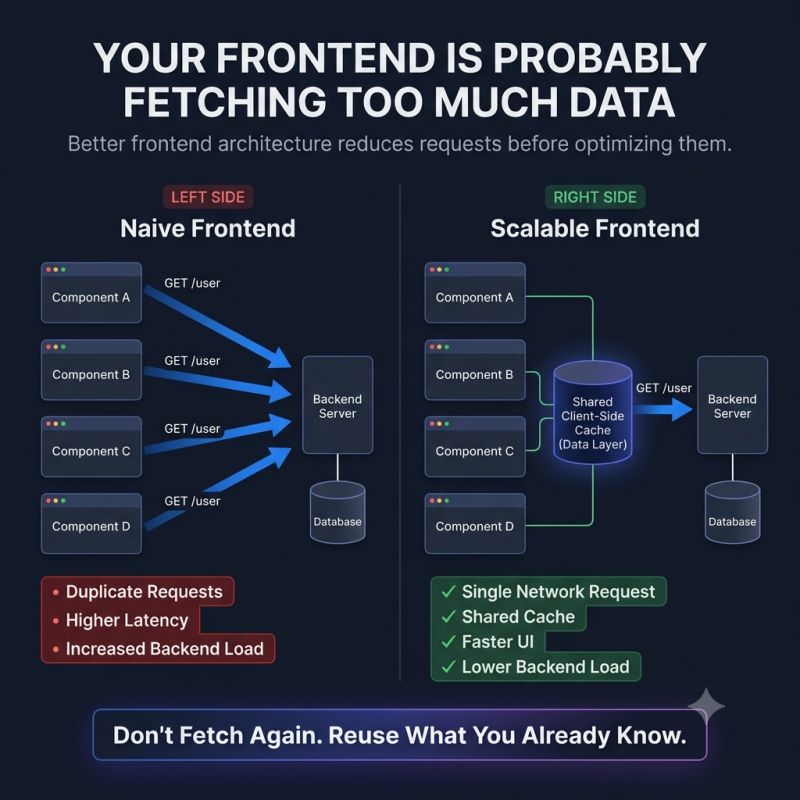
Suddenly, multiple components were requesting the same data.
- The same user profile.
- The same permissions.
- The same feature flags.
- The same configuration.
Not because the data had changed... But because each component behaved as if it was the first one to ask.
That's when performance problems start showing up.
- More network traffic.
- Longer loading times.
- Higher backend load.
- A UI that feels slower than it should.
At scale, frontend architecture isn't just about rendering efficiently. It's about treating data as a shared resource.
Instead of fetching the same information repeatedly, modern applications:
✓ Cache server responses. ✓ Reuse previously fetched data. ✓ Deduplicate identical requests. ✓ Refresh only when the data is likely to be stale.
The result isn't just a faster frontend. It's a system that asks for less.
One principle I always come back to is this: Performance isn't only about making requests faster. It's about making fewer unnecessary requests in the first place.
Every request has a cost.
- CPU.
- Network.
- Database queries.
- Latency.
The fastest request is often the one your frontend never had to make.
Where have you seen the biggest improvement — better caching, request deduplication, or simply reducing unnecessary API calls?
Keep reading
Why a Fast Frontend Can Still Feel Slow
Rendering wasn't the bottleneck — waiting was. Why users experience waiting, not JavaScript execution, and the architectural decisions that reduce it.
Why Great UIs Don't Break When One API Fails
One failed request should not blank the page. Error boundaries, fallbacks and partial rendering that keep an interface usable when a service goes down.
Your UI Shouldn't Wait for Everything
Rendering nothing until every API responds makes a fast app feel slow. Progressive rendering, streaming and skeletons that show users something immediately.