Why Some Requests Shouldn't Wait
Not every request needs an immediate answer. How message queues move slow work off the critical path and keep an application responsive under load.
- Architecture Breakdown
- Message Queues
- Event-Driven Architecture
- Software Architecture
- System Design
(Message Queues Explained)
You upload a profile picture. The application instantly says: "Upload successful."
But behind the scenes...
- The image is still being resized.
- A thumbnail is being generated.
- The CDN is being updated.
- Notifications may be sent.
- Activity feeds are refreshed.
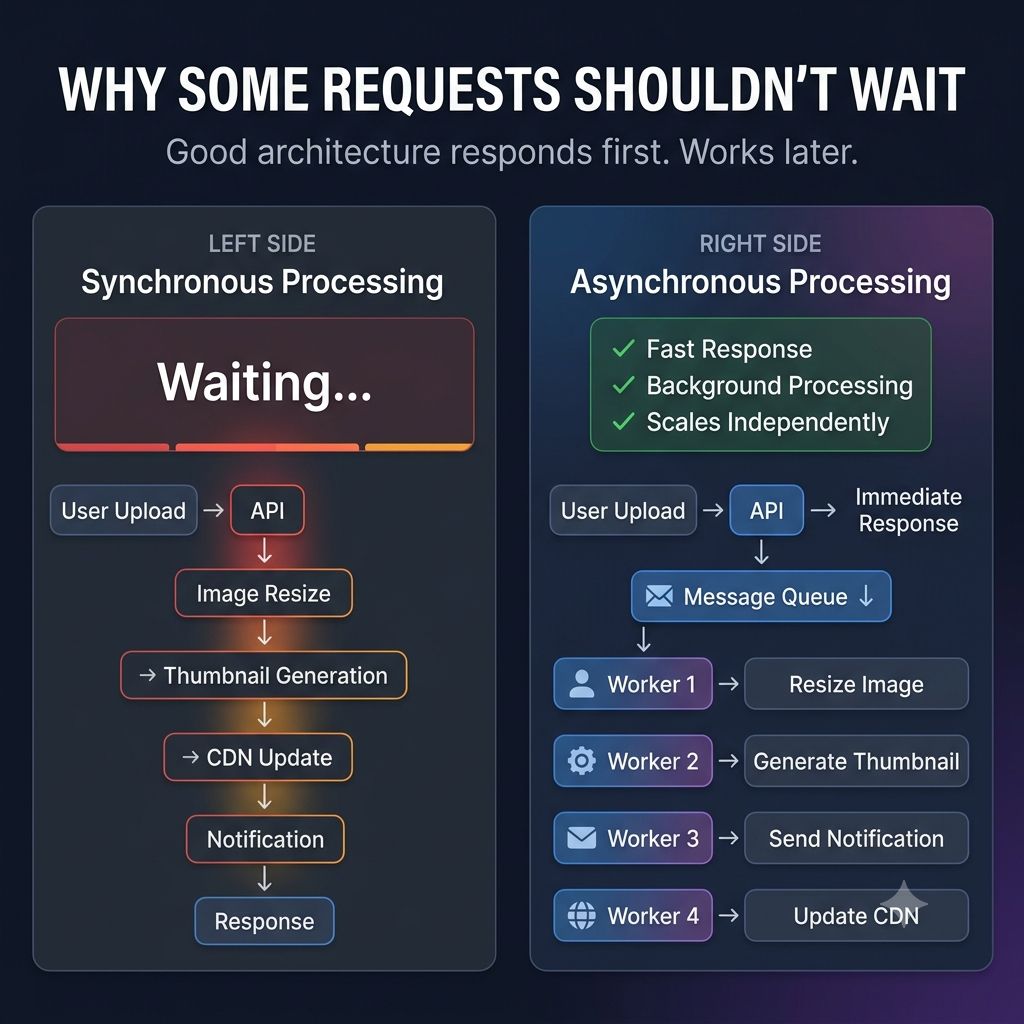
If the application waited for all of that to finish before responding, every upload would feel painfully slow.
Instead, modern systems do something smarter. They separate the user's request from the background work. The application accepts the request, responds immediately, and places the remaining tasks into a message queue for background processing.
This approach has several advantages: ✓ Faster response times ✓ Better user experience ✓ Improved scalability ✓ More resilient systems during traffic spikes
You'll find this pattern everywhere:
- Sending confirmation emails
- Processing payments
- Uploading images and videos
- Generating reports
- Delivering notifications
- Syncing data between services
One lesson that changed how I think about system design: Not every task needs to happen before the user gets a response. Sometimes the best architecture isn't about doing work faster.
It's about knowing which work can happen later. That's why message queues are a fundamental building block of modern distributed systems.
Keep reading
Why Great Systems Don't Make You Wait for Everything
Order confirmation shouldn't wait on payment, inventory, email, and analytics to all finish. How separating the critical path from everything else keeps event-driven systems responsive.
How Does YouTube Process A Video After You Click "Upload"?
Transcoding, thumbnails, captions and distribution all happen after upload. How YouTube's async pipeline hides minutes of work behind one click.
Why Your Dashboard Can Say "Healthy" While Your Users Can't Use the Product
CPU normal, memory normal, error rate 0.2% — and support says users can't check out. Why infrastructure health and user experience are measured by different questions.