How Does YouTube Process A Video After You Click "Upload"?
Transcoding, thumbnails, captions and distribution all happen after upload. How YouTube's async pipeline hides minutes of work behind one click.
- System Design Explained
- Message Queues
- Event-Driven Architecture
- System Design
- Software Architecture
Uploading a video to YouTube feels surprisingly simple.
- Choose a file.
- Click Upload.
- Wait for processing.
- Eventually, it's ready to watch.
But what actually happens after you click that button? Far more than just storing a file.
A simplified journey looks like this:
- 📹 Your video is uploaded and stored.
- 📩 A message is placed into a queue.
- ⚙️ Background workers begin processing the video.
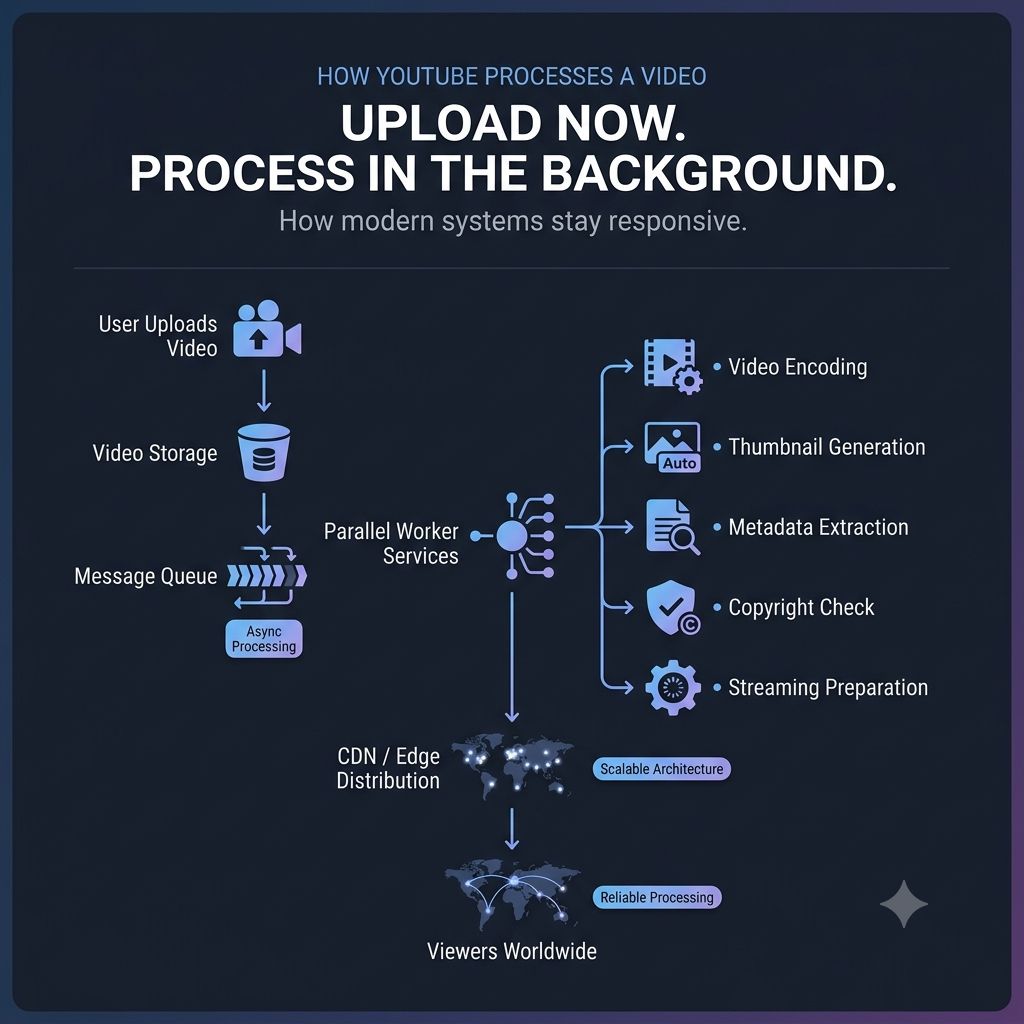
They can work independently on tasks like:
- Creating multiple video resolutions (360p, 720p, 1080p, 4K)
- Generating thumbnails
- Extracting metadata
- Scanning for copyright issues
- • Preparing the video for streaming
- 📦 Once processing is complete, the video is distributed across edge locations so viewers can access it quickly.
Imagine if all of that happened before YouTube acknowledged your upload. You'd be staring at a loading screen for minutes.
Instead, YouTube responds quickly and lets background systems handle the heavy work.
That's the same architectural principle behind many modern applications. Not every task needs to happen immediately. Some tasks only need to happen reliably.
One lesson I've taken from studying large-scale systems: Responsive systems don't do less work. They do the right work at the right time.
Keep reading
Why Some Requests Shouldn't Wait
Not every request needs an immediate answer. How message queues move slow work off the critical path and keep an application responsive under load.
Why Doesn't Your Order Confirmation Wait for Everything to Finish?
Payment, inventory, fraud checks, shipping, notifications — a single "Order Confirmed" doesn't wait for all of them. How publish-subscribe events let one action fan out into independent workflows.
Why Great Systems Don't Make You Wait for Everything
Order confirmation shouldn't wait on payment, inventory, email, and analytics to all finish. How separating the critical path from everything else keeps event-driven systems responsive.