Why Doesn't Amazon Crash on Prime Day?
Millions of shoppers, one seamless checkout. How CDNs, load balancers, caches, and background queues each remove pressure from the next layer during the internet's biggest traffic spike.
- Real System Deep Dive
- Scalability
- Caching
- Load Balancing
- System Design
Every Prime Day, millions of people do the same thing.
- They refresh product pages.
- Search for deals.
- Add items to their cart.
- Checkout within seconds.
From the outside, it feels effortless. Behind the scenes, it's one of the largest scaling challenges on the internet.
So why doesn't Amazon simply add more servers? Because scaling isn't about one component. It's about the entire request journey.
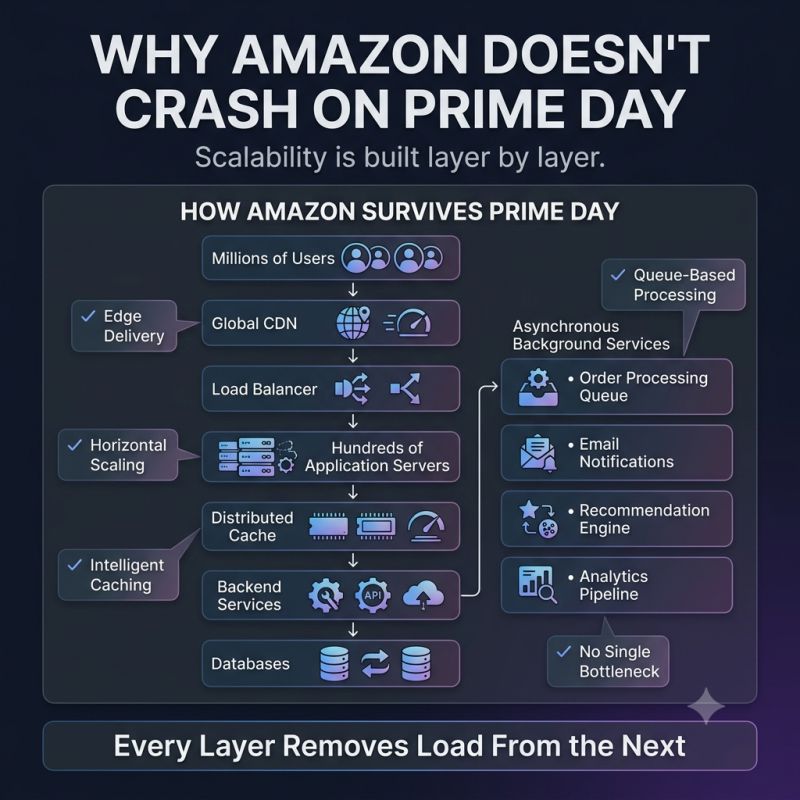
A simplified flow looks like this:
- 🛍️ You open a product page.
- 🌍 A CDN serves images and static assets from an edge location near you.
- ⚖️ A load balancer distributes traffic across hundreds of application servers.
- ⚡ Frequently accessed product details are served from distributed caches.
- 📦 Only requests that require fresh inventory or pricing reach backend services and databases.
- 📩 Non-critical work — like sending emails, updating recommendations, or generating analytics — is pushed to background queues.
Notice the pattern?
Every layer removes pressure from the next one. That's how systems survive massive traffic spikes.
Not by making one server infinitely powerful... But by ensuring no single component has to do everything.
One lesson that's shaped how I think about architecture: Scalable systems aren't built by adding capacity everywhere. They're built by reducing the work each component has to perform.
That's why Prime Day isn't powered by one extraordinary server. It's powered by thousands of well-coordinated architectural decisions.
Which large-scale system would you like to see broken down next — Spotify, Uber, Google Search, or ChatGPT?
Keep reading
Why Doesn't GitHub Stop Working When Everyone Pushes Code at the Same Time?
Millions of developers pushing, pulling, cloning, and opening pull requests at once, and GitHub keeps serving repositories. How each layer, from CDN to caching to background queues, protects the one behind it.
How Does YouTube Serve Billions of Videos Without Melting Down?
Millions press Play at the same time, yet videos start in seconds. How edge servers and distributed caching move content closer to you instead of making you wait.
Why Great Systems Don't Query the Database Every Time
The database wasn't overloaded — the application was asking the same question thousands of times. How caching lets systems scale by making databases work less.