Why Does Gmail Say "Sending..." Before Your Email Is Actually Sent?
Gmail acknowledges your email before it leaves the building. Why accepting work first and processing it later makes systems feel instant and stay reliable.
- System Design Explained
- Reliability
- System Design
- Software Architecture
Have you ever noticed what happens after you click Send in Gmail? The email doesn't instantly become "Sent." For a brief moment, you see: Sending...
That tiny status tells a much bigger story about distributed systems. When you press Send, Gmail doesn't just forward your email and hope for the best.
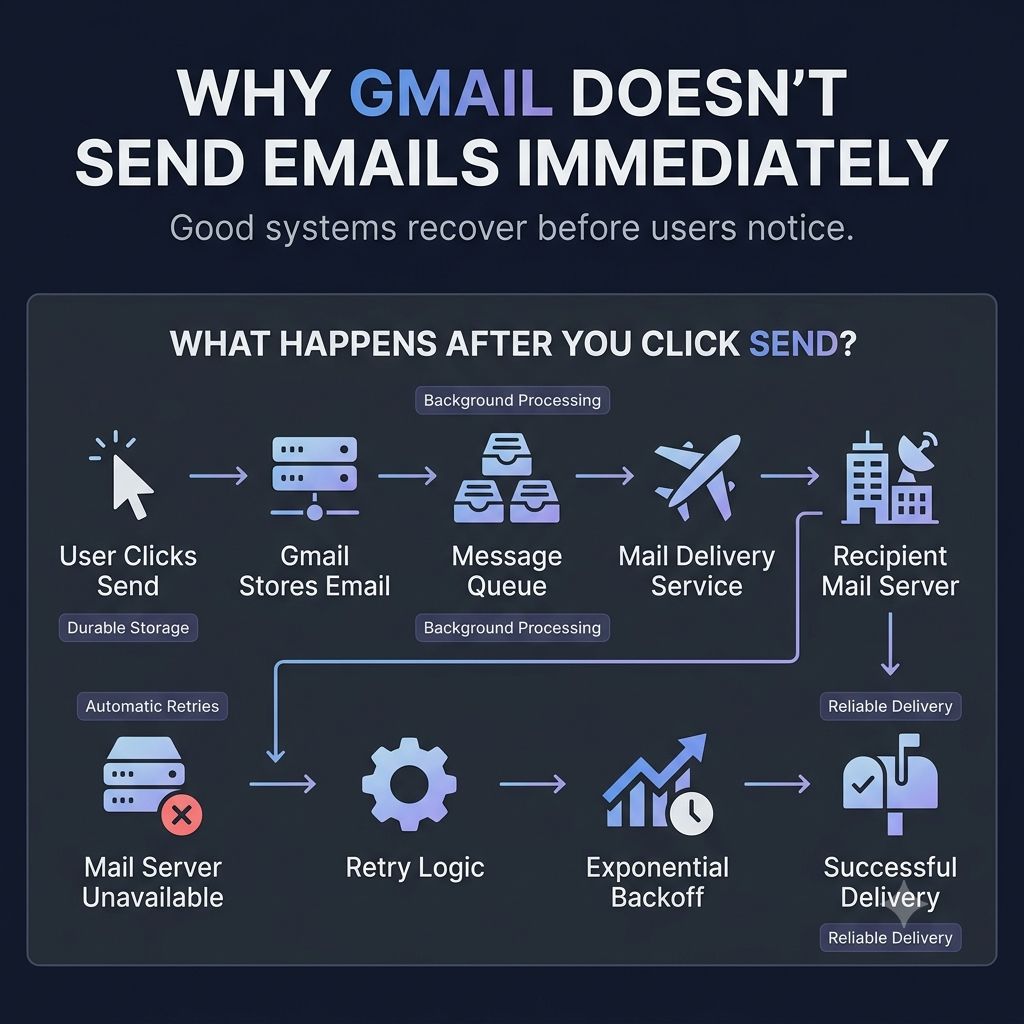
A simplified flow looks like this:
- 📧 You click Send
- ✅ Gmail stores the email safely.
- 📩 A background service takes responsibility for delivering it.
- 🌐 It attempts to contact the recipient's mail server.
- ❌ If the destination is temporarily unavailable, Gmail doesn't immediately fail.
It retries. Sometimes minutes later. Sometimes longer.
Only after repeated failures does it give up and notify you.
Why? Because temporary failures happen all the time.
- Networks become unavailable.
- Mail servers restart.
- Connections time out.
A successful email system isn't one that never encounters failures. It's one that recovers from them without asking the user to press Send again.
That's one of my favorite principles in system design: Reliable systems don't assume success.
They assume failure, plan for recovery, and make that complexity invisible to users.
The next time you see "Sending...", remember: You're watching resilience in action.
Keep reading
How Does Netflix Load Your Home Screen So Fast?
Netflix doesn't build your home screen after you open the app — it prepares most of it before you arrive. Why precomputation and caching beat request-time work.
How Does Stripe Avoid Charging You Twice?
Stripe's idempotency keys explained — how a payment API safely handles the same request arriving more than once without charging the customer twice.
Why One Click Shouldn't Create Two Orders
Users double-click, browsers retry and networks reconnect. How idempotency keys stop one intent from becoming two orders.